Skip to content

/

KYC registry

Helping KYC teams in India turn scanned paper forms into checked records, field by field

KYC registry, new application

The KYC Registry Platform’s new application screen for a sample investor: the scanned paper form in a viewer on the left, identity fields on the right with the PAN marked Verified. A pencil note points at the page counter: the paper form stays in view, all 8 pages.The KYC Registry Platform’s new application screen for a sample investor: the scanned paper form in a viewer on the left, identity fields on the right with the PAN marked Verified. A pencil note points at the page counter: the paper form stays in view, all 8 pages.
Paper on the left, data on the right, and the maker in between.
In 15 secondsKYC registry
Problem
Brokers and funds typed 8-page paper KYC (Know Your Customer) forms from scans, 66 fields each. Late mistakes put applications on hold.
My role
One of three designers on KFintech’s new KYC agency, my first project. My first drafts became the team’s base.
Key move
OCR (text-reading software) fills fields beside the scan, and checkers start where the OCR struggled.
Result
Shipped at launch, 30 April 2025, 100 days after I joined. The agency’s CEO says I sped up production.
Company
KFintech, Hyderabad, product renamed KYC Registry Platform
Role
Product Designer, one of three
Team
3 designers, product owner, business analyst, KYC operations, developers, OCR vendor
Timeline
Jan 2025 – Jul 2025
Platform
Web, desktop
Status
Shipped at launch, 30 Apr 2025
100 daysfrom joining KFintech to the agency’s launch
66fields in one individual application
3flows I drew first: registration, KYC entry, KYC review
7–8steps per application, for a person or a company
A Figma-style canvas of KYC Registry Platform frames: the KYC entry screen, selected at 1512 by 896, the checker review and a flagged field reconstructed in the final style, with the work tray and the hold reasons dialog on wider screens.A Figma-style canvas of KYC Registry Platform frames: the KYC entry screen, selected at 1512 by 896, the checker review and a flagged field reconstructed in the final style, with the work tray and the hold reasons dialog on wider screens.
From my KYC Registry Platform Figma file. The flagged-field frame is redrawn in the final style.

Published with KFintech’s permission. Every name, ID, scan and signature shown is a dummy, and the product’s branding is changed. Happy to walk through the real work on a call.

A one-minute tour of the main flows. Narrated by an AI copy of my voice.

Problem

66 fields, all by hand

A brand-new digital platform, and its main input was a scanned paper form. Nothing gets approved until a person has checked every field on it.

In India, nobody invests before a KYC check. A KYC Registration Agency stores each record once, so any broker or fund can reuse it.

A maker at the broker or fund scans an 8-page form and types 66 fields per person. A checker at the agency reads every field again. Ops staff, the business analyst and the product owner told us mistakes surfaced late, and applications went on hold.

Three rules shaped every screen: a person verifies each field, fields follow the official form, and launch waited on SEBI, the market regulator.

We wanted makers to type less, and mistakes caught at the field, not after submission.

Investor

Fills in a paper KYC form

Broker or fund, the maker

Scans the form and enters the fields

KYC agency, the checker

Verifies every field, then approves or holds

Branch: another KYC agency. A change to a record it holds travels there as a formal request

One stored record

Checked once

Any other broker or fund

Fetches the record by PAN, India’s tax ID

One record, checked once, reused by every broker and fund. Drawn for this case study.

Maker

Staff at a broker or fund

Job
Turn a paper form and documents into a KYC application.
Pain
Typing 66 fields from a scan.

Authorizer

Senior staff at the same firm

Job
Approve a modification before it leaves the firm.

Checker

Operations staff at the agency

Job
Verify every field against the scan, then approve or hold.
Pain
Rereading every field to find the few the OCR missed.

Three roles touch one modification. Reconstructed from the requirements document’s role list.

Context

A new agency, a fixed date

This was my first project at KFintech, and a new domain for the company. Five agencies already did this work, so we looked for new technology that could take the typing off people’s hands.

Three designers shared the screens. I drew the first drafts of registration, KYC entry and KYC review; the other two built on that base.

Two things were hard. I had to learn KYC in my first weeks, from the requirements document and the ops team. And I had to show a machine’s best guess to people who must not get a single field wrong.

Deep dive: how KYC works in India, for readers outside it

An intermediary is any firm registered with SEBI, India’s market regulator, that sells investments: brokers, mutual funds, advisers. The intermediary collects the form and documents, and its staff enter the data. The agency checks it and stores one record.

Any other intermediary can then fetch that record with the investor’s PAN, India’s tax ID. If details change, the intermediary files a modification. If the record sits with a different agency, the request travels there.

Each record carries a status: registered, validated, on hold or rejected. On hold means new investments through that record can’t go ahead until the investor fixes it.

  1. 20 Jan 2025I join KFintech. My first project, after onboarding. I start with the requirements document and the team.
  2. Feb–Apr 2025Two drafts, then hi-fi. My accordion drafts become a viewer and a stepper; two designers build on them.
  3. 30 Apr 2025Launch. SEBI grants registration and the agency goes live with our screens.
  4. May–Jul 2025After launch. Fixes and new screens until I move fully to other products.

100 days from joining to launch, then three more months of fixes and new flows.

Broker or fund, maker

Create application

PAN, name, date of birth, scan

PAN already on record → Modify

Under 18 → guardian fields

Company PAN → 8-step path

Work tray

The application waits in the queue

7 or 8 steps

OCR pre-fills each field and flags unclear ones; the maker confirms

Submit

Sent to the agency

KYC agency, checker

OCR flags

Unreadable and blank fields

Checker review

A ring per section, then every field verified

Approve

Unlocks once every field is verified

Hold

A reason per section, back to the maker

The whole loop, with the three places it branches. Reconstructed for this case study.

Change 01

The paper stays in view

Typing from paper means reading and writing at once. So the scan stays on the left in a viewer, beside the fields and a stepper.

The requirements document used OCR only at the end, to compare. In a team brainstorm, we added it at the start: it pre-fills each field, and the maker confirms. A careless confirm still gets caught, because the checker opens every section and confirms it.

My part was what the maker sees once the OCR has read the form. Select a field and its box lights up on the scan. Unsure readings carry a flag.
Options
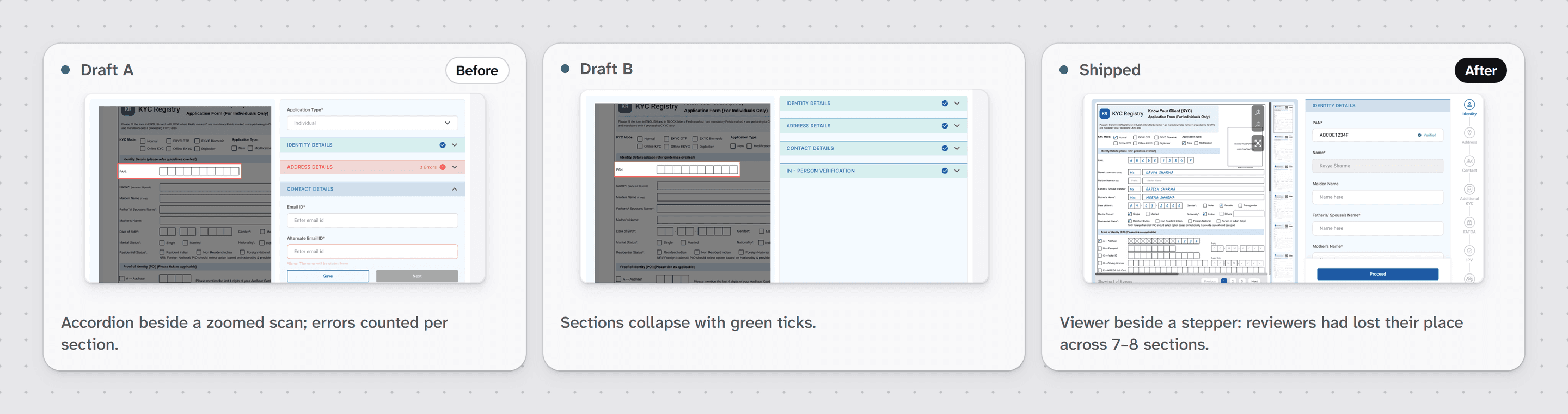
My accordion drafts beside a fixed scan, or a document viewer beside a stepper
I chose
The viewer and stepper. In reviews, the product owner and the ops staff who check these forms lost their place across 7–8 sections. The scan was too small to read.
Trade-off
The viewer takes over half the width, so long sections scroll in a narrow column.
Three versions of the KYC entry screen, same crop: Draft A with an accordion beside a zoomed scan and errors counted per section, Draft B with sections that collapse with green ticks, and the shipped document viewer beside a stepper.Three versions of the KYC entry screen, same crop: Draft A with an accordion beside a zoomed scan and errors counted per section, Draft B with sections that collapse with green ticks, and the shipped document viewer beside a stepper.
My two real drafts, then the version that shipped. Reviewers lost their place in the accordion.
The KYC entry screen with one field flagged: the Father’s or Spouse’s Name field is outlined in red with “Check this field: the scan is blank here”, and its box is outlined on the scanned form. Pencil notes: its box lights up on the scan; a verified PAN fills the name and locks it; the flag says why. Reconstructed in the final style.The KYC entry screen with one field flagged: the Father’s or Spouse’s Name field is outlined in red with “Check this field: the scan is blank here”, and its box is outlined on the scanned form. Pencil notes: its box lights up on the scan; a verified PAN fills the name and locks it; the flag says why. Reconstructed in the final style.
Viewer, stepper and one flagged field, redrawn in the final style. The built flag looks different.
Animation of fields filling from a scanned form, one flagged field being checked against the scan and corrected.Animation of fields filling from a scanned form, one flagged field being checked against the scan and corrected.
Reconstructed: pre-fill, flag, check, fix.

Change 02

Start where the OCR struggled

The checker rereads all 66 fields, so I gave them a head start. Each section gets a ring: the share of fields the OCR read cleanly.

The OCR flags the regions it can’t capture and the fields left blank. Anything under 100% turns the section red. The ring approves nothing; it shows where to look first.

Options
One list of every field, flags on problem fields only, or a score per section
I chose
A score per section, matching the official form and the maker’s stepper.
Trade-off
The ring sets the order of the work, but every field still gets read.
The checker review screen: the scanned form on the left; on the right the identity section reads 80% with an Errors marker, each checked field is marked Verified, Hold is available and Approve is greyed out. A lifted strip shows the field further down, Mother’s Name, still Unverified. Pencil notes explain the ring, the Verified marks, the locked Approve and the field still to check.The checker review screen: the scanned form on the left; on the right the identity section reads 80% with an Errors marker, each checked field is marked Verified, Hold is available and Approve is greyed out. A lifted strip shows the field further down, Mother’s Name, still Unverified. Pencil notes explain the ring, the Verified marks, the locked Approve and the field still to check.
The checker starts in the red section.

Change 03

Approve waits for every field

Maker-checker means one person enters and another verifies. The requirements document made Approve wait for every field. My job was to make that lock feel fair.

So the checker always sees what is left: the ring and a Verified mark per field. Hold asks for a reason by section, so the maker knows what to fix.

Options
Hide Approve until done, show it disabled with progress, or allow it with a warning
I chose
Disabled, with progress in view.
Trade-off
Clean applications still need every field ticked. The Verified marks show what’s left.
Deep dive: how a modification is reviewed

A change to an existing record first passes an authorizer at the broker or fund. At the agency, the checker compares the old and new signature and marks it Matched or Unmatched. Then each supporting document gets a tick or a cross.

Last, old and modified data sit side by side, with the changed sections flagged, so the checker reads only what moved. If another agency holds the record, the change travels there as an interoperability request, a formal hand-off between agencies, and its status is tracked until it returns.

A dialog asking the checker to pick a reason for each section before holding the application.
A hold names a reason for each section, so the maker knows what to fix.
The old and new captured signatures side by side, with Unmatched selected and a red Unverified label.
Modification review: signature, documents, then only what changed.

What failed

My long form lost the argument

I argued for one long form, with markers where there was a mistake. That way nobody has to click sections open again and again.

The team disagreed: long forms confuse, and short sections let a maker verify one part at a time, or skip one whose details haven’t arrived.

Paperwork often arrives in pieces. That argument won, and the stepper shipped.

Two versions side by side, same crop: my long single-column form, redrawn as a wireframe with red markers in the margin, and the shipped screen with short sections and a step list.Two versions side by side, same crop: my long single-column form, redrawn as a wireframe with red markers in the margin, and the shipped screen with short sections and a step list.
My idea, redrawn, next to the version that won. Short sections fit paperwork that arrives late.

Craft

Rules the form already knows

Every rule the system can apply is a field nobody types.

  • A verified PAN, India’s tax ID, fills the name from the tax database and locks it.

  • The work tray, the queue of applications, colours each row red, amber or green by turnaround time.

A table of KYC applications with a red, amber or green bar on the left of each row and status chips.
Turnaround colour on every row, so late files stand out.
The KYC entry screen: the scan shows the handwritten PAN and name, and in the form the PAN field has a green Verified label with the name greyed below it.
One verified number fills the fields that depend on it.
StateColoursRatioWCAG AAPassing shade, same palette
“Errors” label, 14 px, on the checker section headerText #E33D3C on header #FAC1C12.69:1Fail, needs 4.5:1Red 700 #950404: 5.86:1
Ring at 80%, a graphic on the red headerRing #FB5958 on header #F0D5D52.28:1Fail, needs 3:1Red 700 #950404: 6.61:1
Ring at 100%, a graphic on the teal headerRing #01808E on header #D3EDEE3.82:1Pass, needs 3:1No change needed
“100%” label, 12 px, on the teal section headerText #01808E on header #D3EDEE3.82:1Fail, needs 4.5:1Secondary 800 #015B65: 6.37:1
“Verified”, 12 px, on fields for maker and checkerText #22C55E on field #FFFFFF; 2.07:1 on the grey field2.28:1Fail, needs 4.5:1Green 800 #0C5A29: 8.37:1, 7.58:1 on grey
“Unverified”, 12 px, in the signature checkText #FB5958 on card #FFFFFF3.15:1Fail, needs 4.5:1Red 700 #950404: 9.14:1
Approve, disabled, checker footer, 14.6 pxText #F0F0F0 on button #A8A8A82.09:1Exempt, inactive controlExempt under WCAG 1.4.3
Hold and Proceed, primary buttons, 14.6 pxText #FFFFFF on button #2057A67.06:1Pass, needs 4.5:1No change needed
Inactive step label, 14 px, in the maker’s stepperText #B2B2B2 on page #FFFFFF2.12:1Fail, needs 4.5:1Neutral 600 #666666: 5.74:1
Turnaround bars, a graphic on each work tray rowRed #FB5958, amber #FFBA5E, green #3FBE6ERed 3.15:1, amber 1.60:1, green 2.39:1Red passes; amber and green fail (need 3:1)Amber #D97706: 3.01:1 on the selected row. Green #12873D: 4.61:1.

The state colours as shipped. Most miss AA contrast, so every state also carries a word.

Outcome

Live on launch day

The agency got SEBI registration and launched on 30 April 2025. Our screens shipped close to the designs. The flag and highlight look different in the build. I stayed on until July, adding new flows.

It sits behind a login, so I have no usage numbers. What I’d measure:

  • Fields the OCR reads right the first time

  • Applications approved without a hold

  • Time from upload to approval

  • Holds by reason

  • Sections that open green, so the ring isn’t noise

“Having Amandeep on the project sped up production. His coordination was a big positive for the project, and his ideas helped us steer the design in the right direction.”
CEO of KFintech’s KYC agency, also its product owner

Names left out for privacy. Happy to share references.

Retrospective

Draw the bad scans too

Two things I’d change. Three designers shared one base, so I’d set up shared components on day one. And I’d draw the bad scans in the final file. The highlight and flag shipped from my early drafts; the final file never showed them.

Next case, IR portalHelping listed Indian companies see who really owns their shares
Let’s work together

Open to new work and collaborations. Email is the quickest way to reach me.

Resume (PDF, opens in a new tab)
hi@amandeepux.com
Based in Hyderabad, India.© 2026 Amandeep Singh. Designed and built in Framer by me.Privacy